
Understanding Semantic HTML
Semantic HTML uses elements that describe the meaning and purpose of the content they contain.
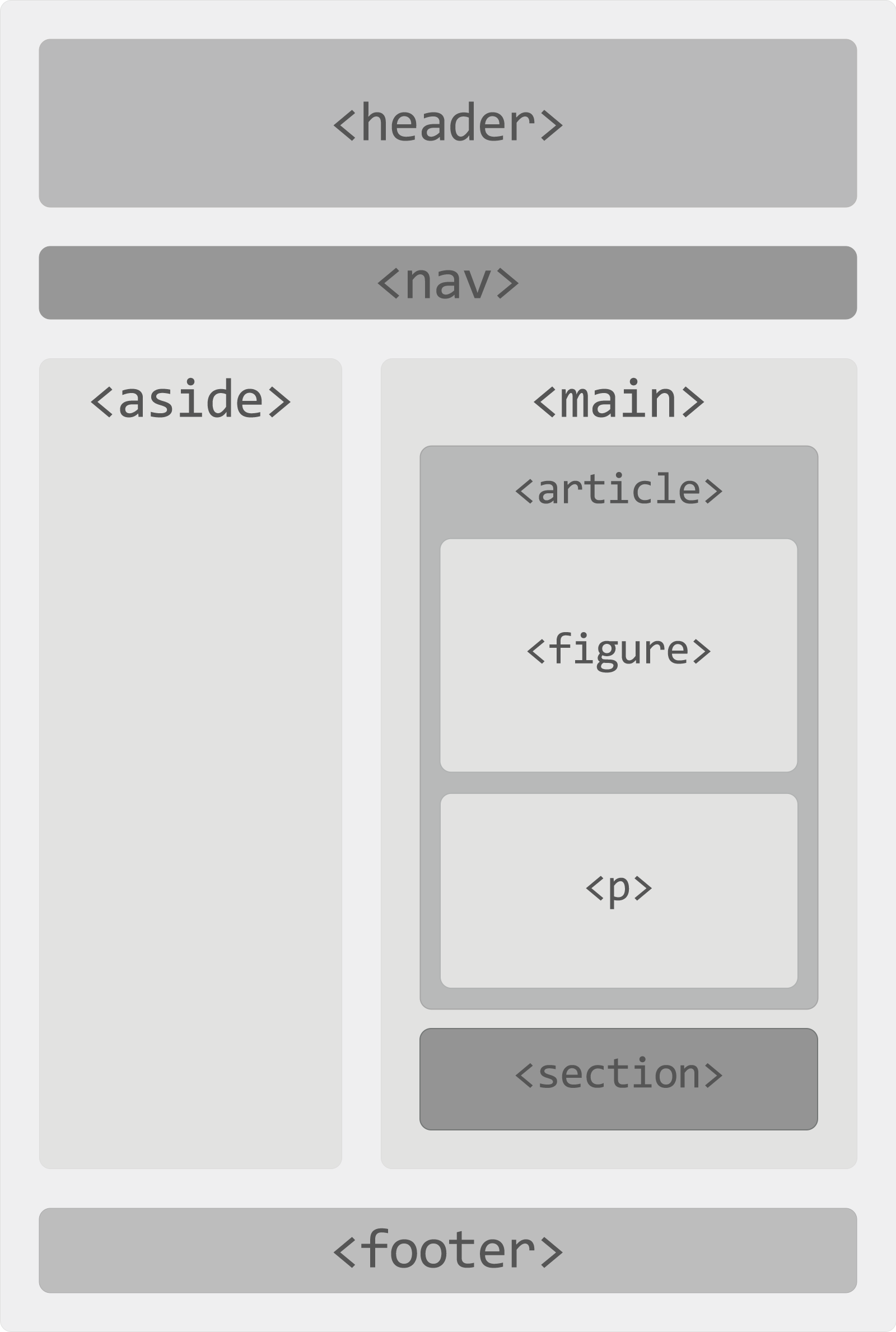
Instead of relying only on generic containers, semantic elements such as <header>, <nav>, <main>, <section>, <article>, <aside>, and <footer> help describe how different parts of a webpage are organized.
What Is Semantic HTML?
Semantic HTML means choosing elements according to the meaning or purpose of the content rather than choosing them only for their appearance. The element itself helps describe what the content represents.
For example, <nav> identifies a section containing major navigation links, while <main> identifies the primary content of the document. The element names provide information about the role of the content even before any CSS is applied.
Semantic vs Non-Semantic HTML
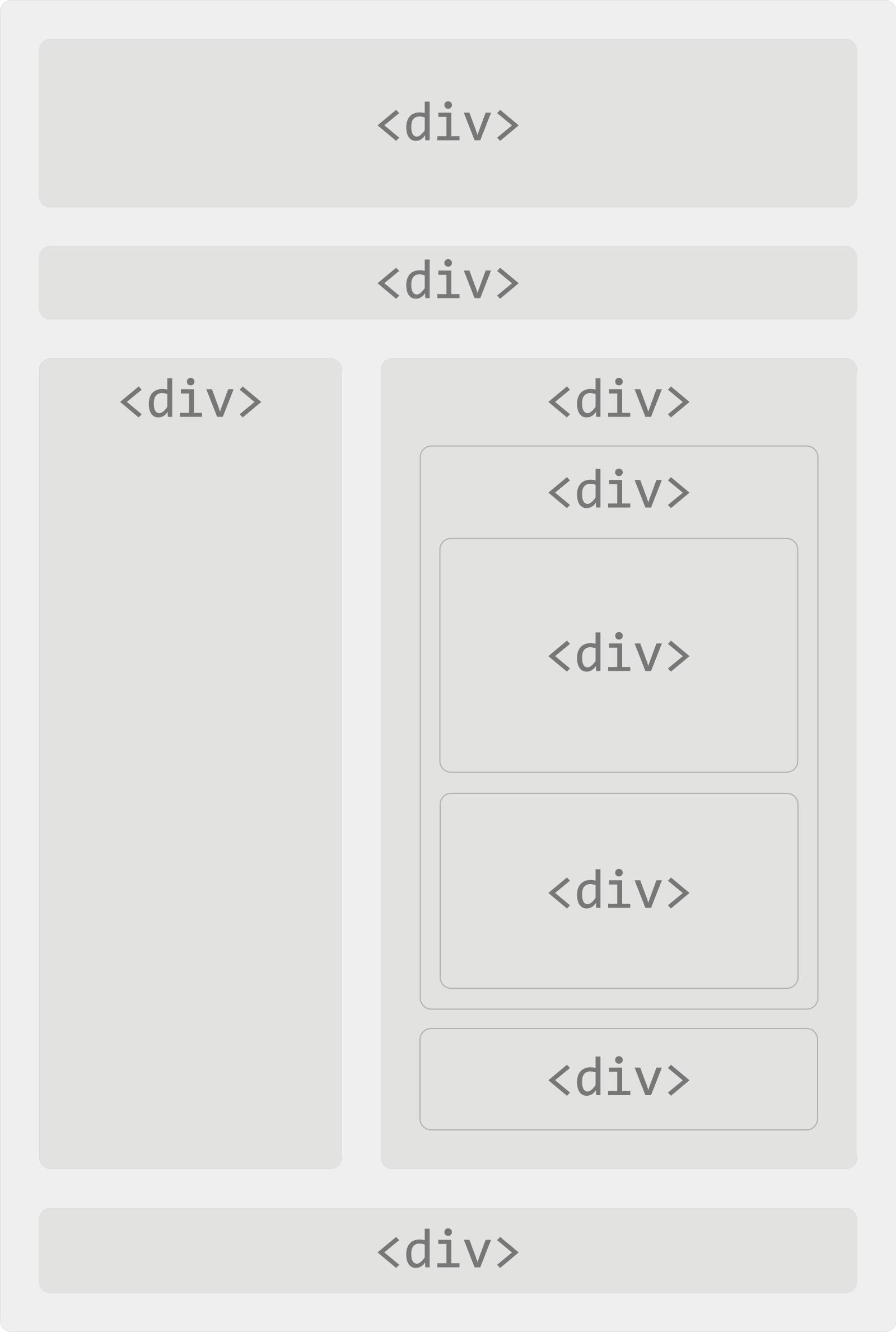
Generic elements such as <div> and <span> do not describe the meaning of their content. They are useful when no more appropriate semantic element exists, but they should not automatically replace elements that already describe the content's purpose.
A webpage built primarily with generic containers might use markup such as:
<div class="header">
  <div class="navigation">...</div>
</div>

<div class="main">
  ...
</div>

<div class="footer">
  ...
</div>
Semantic HTML can communicate much of the same structure directly through the markup:
<header>
  <nav>...</nav>
</header>

<main>
  ...
</main>

<footer>
  ...
</footer>
Both versions can be styled to look identical, but the semantic version provides more information about the purpose of each part of the document.
Common Semantic Elements
HTML provides many elements that describe specific types or regions of content. Common elements used to organize webpages include:
<header>- introductory content for a page or section.<nav>- a section containing major navigation links.<main>- the primary content of the document.<section>- a thematic grouping of content.<article>- self-contained content that can stand independently.<aside>- content related indirectly to the surrounding content.<footer>- footer information for a page or section.<address>- contact information for a person or organization associated with an article or document.
Semantic HTML extends well beyond these structural elements. Elements such as <figure>, <time>, <details>, and <summary> also communicate meaning about the content they contain.
Semantic Page Structure
A typical webpage can combine several semantic elements to describe its major regions.
<header>
  <h1>Example Website</h1>
  <nav>
    ...
  </nav>
</header>

<main>
  <article>
    <h2>Article Heading</h2>
    <p>Article content...</p>
  </article>

  <aside>
    <h2>Related Information</h2>
    <p>Related content...</p>
  </aside>
</main>

<footer>
  <p>Footer information</p>
</footer>
This is only one possible structure. Semantic elements should be selected according to what the content actually represents rather than following a fixed page template.
Benefits of Semantic HTML
Semantic HTML makes the structure and purpose of content clearer to browsers, developers, assistive technologies, search engines, and other systems that process webpages.
- Clearer markup: Element names help explain the purpose of different page regions.
- Maintainability: Meaningful structure can make HTML easier to understand and update.
- Accessibility: Appropriate elements can provide useful structure and landmarks for assistive technologies.
- Search engines: Meaningful markup helps machines understand the organization and context of webpage content.
- Consistency: Standard HTML elements provide a common vocabulary for describing content.
Semantics and CSS
Semantic HTML describes what content means; CSS controls how that content looks. Choosing a semantic element does not prevent you from styling it in any way appropriate for the design.
header {
  padding: 20px;
}

nav {
  margin-bottom: 20px;
}

main {
  max-width: 1200px;
  margin: 0 auto;
}
A <header> does not need to look a particular way simply because it is a header. Its semantic meaning and its visual presentation are separate concerns.
Semantics and Accessibility
Semantic elements can provide meaningful document structure that assistive technologies use to help people understand and navigate a webpage. Elements such as <nav> and <main>, for example, can identify important page regions.
Semantic HTML does not automatically make an entire website accessible, but choosing the correct elements provides a stronger foundation than recreating the same structure entirely with generic containers.
Semantics and SEO
Search engines analyze HTML to understand webpage content and its organization. Meaningful elements can provide additional structural context about different parts of a document.
Semantic HTML is not a shortcut to higher search rankings. It should be used because it accurately describes the content, improves document structure, and makes the markup easier for both people and machines to interpret.
Semantic HTML Example
The following example shows a small webpage organized with semantic elements. Experiment with the markup by adding another <section>, moving the <aside>, or examining how the document remains understandable even without relying on generic container names.
Semantic HTML Best Practices
- Choose elements according to the meaning and purpose of the content.
- Use a semantic element instead of a generic
<div>when an appropriate element exists. - Do not choose an element simply because of its default appearance.
- Use headings to create a logical hierarchy within semantic sections.
- Use
<main>for the document's primary content rather than as a general-purpose wrapper. - Use
<section>and<article>according to the purpose of the content rather than interchangeably. - Use CSS to control presentation instead of choosing HTML elements for visual styling.
- Use
<div>and<span>when a generic container is genuinely appropriate.